
MahaBhulekh 7/12 Satbara - Maharashtra Land Records
Search 7/12 Satbara records, check gat or survey details, and compare rural Maharashtra land documents
Overview
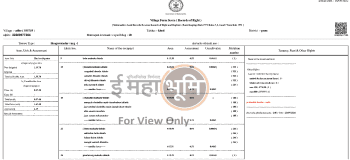
Maharashtra 7/12 Satbara, also searched as MahaBhulekh 7/12, Satbara Utara, or 7/12 extract, is a rural land record used to check ownership, crop, land-use, rights, and revenue details for a land parcel.
On Landeed, users can search and fetch Maharashtra 7/12 Satbara records using available district, taluka, village, gat number, or survey number details. The result depends on whether the selected administrative area and land identifier match the MahaBhulekh-side record.
Details commonly used for Maharashtra 7/12 search
Satbara search commonly needs district, taluka, village, gat number, survey number, or account-holder details where available. If the wrong village or gat number is selected, the search can return no record or a different parcel.
What a 7/12 Satbara can show
A Satbara combines Village Form 7 and Village Form 12. It can show owner or account-holder details, gat or survey number, land area, land type, crop entries, rights, loans or other encumbrance notes, mutation references, and revenue-record remarks.
Why 7/12 search may not show the expected result
- Wrong district, taluka, or village selected
- Gat number or survey number entered differently from the record
- Urban property requiring Property Card instead of rural 7/12
- Recent mutation, inheritance, or Ferfar entry not reflected yet
- Old records requiring a different certified-copy or legacy-record path
7/12 vs Property Card vs Index 2 vs Bhunakasha
- 7/12 Satbara: rural ownership, crop, rights, and revenue details
- Property Card: urban city-survey ownership record
- Index 2: registration summary for a registered transaction
- Bhunakasha: cadastral map and boundary context
- Ferfar: mutation or ownership-change record entries
Related Maharashtra property records
Use cases
Why Landeed?

FAQs
What is Satbara?
The Satbara extract combines Village Form No. 7 (ownership) and Village Form No. 12 (crop details) into a single government-issued record.
- Land owner’s name
- Account holder details
- Gat / Survey number & total area (Hectare/Are)
- Land type (irrigated / non-irrigated)
- Crop information with season (Kharif / Rabi)
- Encumbrances such as loans or other rights
- Remarks and mutation history
Why is Satbara essential?
Without this extract you cannot:
- Legally prove ownership
- Sell or transfer land
- Secure agricultural or housing loans
- Register inheritance or mutations (Ferfar)
- Claim government benefits like PM Kisan
What is Satbara extract?
Satbara extract (7/12) is a government document of land ownership in Maharashtra. It contains land owner's name, area, crop information and other rights.
How to view Satbara online?
On Landeed App: District → Taluka → Village → Enter gat number → View Satbara immediately. Also available on Mahabhulekh (bhulekh.mahabhumi.gov.in).
What's the difference between 7/12 and 8A?
7/12 gives complete information of one gat (land). 8A extract gives list of all lands under one person's name.
| Criteria | Satbara (7/12) | 8A Extract |
|---|---|---|
| What it shows | Ownership + crop & encumbrance details for a single gat | List of all lands under one account holder |
| Best for | Purchase, loans, legal verification | Understanding total land holding |
| How to search | Gat / Survey number | Account number / holder name |
Tip: Use 8A (Village Form 8A) when you want to see all parcels registered to one person.
How many days to get Satbara extract?
Digital Satbara on Landeed in 2 minutes. Certified Copy takes 2-5 days.
Mahabhulekh website not working, what to do?
Mahabhulekh server is often busy. Use Landeed App — fast and simple.
How to remove loan entry from Satbara?
After loan repayment, get NOC from bank and register Ferfar at Talathi office. After entry removal, get new Satbara.
Where to view Ferfar records?
On Aapli Chavdi portal, online Ferfar records can be viewed. For old records, visit Talathi office.
How to view Pune district Satbara?
On Landeed: Select district "Pune" → Select taluka → Select village → Enter gat number → View Satbara.
How to change name on Satbara?
Apply for Ferfar at Talathi office. Attach sale deed / inheritance certificate / gift deed. After Ferfar approval, name changes on Satbara.
Are old Satbaras (before 1990) available?
Yes! Old Satbaras also available via Landeed. Order Certified Copy.
Mahabhulekh vs Landeed?
| Feature | Mahabhulekh (bhulekh.mahabhumi.gov.in) | Landeed |
|---|---|---|
| Interface | Complex desktop portal | Clean UI for web + mobile app |
| Language | Marathi / English | Marathi / English |
| Performance | Often slow or offline | Optimized, fast servers |
| Documents | Only 7/12 | 7/12, 8A, Ferfar, maps, certified copy orders |
If Mahabhulekh is down, open the Landeed app to continue your search.
How do I track Ferfar (mutation) records?
Ferfar captures any change in ownership caused by sale, inheritance, gift, partition, or court order.
- Aapli Chavdi: View recent online mutation entries.
- Talathi Office: Access legacy registers.
- Landeed: See consolidated Ferfar history alongside Satbara.
Need some help?

