
Kaveri EC Online - Karnataka Encumbrance Certificate

Search Karnataka EC records, check Kaveri document or property details, and separate EC from Bhoomi RTC

Product image
Product image

Overview

Last updated: May 7, 2026

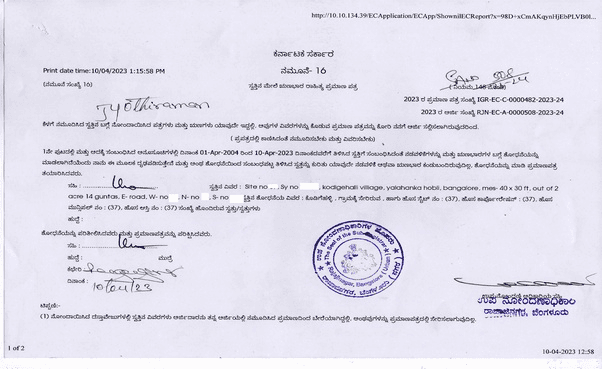
A Karnataka Encumbrance Certificate, commonly searched as Kaveri EC, Karnataka EC, EC view, or EC download, is used to check registered property transactions and encumbrance history for a selected period. It is usually checked before buying, selling, applying for a loan, or reviewing property documents.

On Landeed, users can search and fetch Karnataka EC-related records using the available property or registration details. The result depends on whether the district, taluk, hobli, village, SRO, property identifier, document number, party name, and search period match the registration records.

Details commonly used for Karnataka EC search

EC search may require district, taluk, hobli, village, SRO, survey number, site number, khata number, document number, party name, property description, and the from-date and to-date for the EC period. The right search path depends on whether the property is agricultural land, a residential plot, an apartment, or an urban property.

What a Karnataka EC can show

An EC can show registered transactions such as sale, mortgage, gift, release, settlement, or other registered entries for the selected period. It helps users check transaction history and possible encumbrances, but it should be reviewed with RTC/Pahani, sale deed, khata records, and map records where applicable.

Why Karnataka EC search may not show the expected result

  • Wrong SRO, district, taluk, hobli, or village selected
  • Survey number, site number, khata number, or document number mismatch
  • Search period does not include the transaction year
  • Party name entered differently from the registered document
  • Recent registration not reflected yet

Kaveri EC vs Bhoomi RTC vs E-Khata

  • Kaveri EC: registered transaction and encumbrance history
  • Bhoomi RTC/Pahani: rural land ownership, cultivator, crop, and revenue details
  • E-Khata / E-Swathu: property-account, local-body, and tax-related record details
  • Sale Deed: full registered ownership-transfer document
  • Village Map: map and parcel-location context

Related Karnataka property records

Preview Image
Preview Image

Use cases

Why Landeed?

mdi:tick
Free searches *
mdi:tick
Guaranteed document delivery
mdi:tick
24/7 Customer support
mdi:tick
Soft copy and hard copy
mdi:tick
All day access

Ratings & Reviews

Google Play Store

Transparent and prompt

I availed thier services for Khata transfer & mutation recored update. Ramesh was transparent on all the fees & promptly updated on timelines. Will be referring any friends for such services

manj gul1 month ago
Google Play Store

Guided step by step

I was guided by an agent step by step and got the documents within the assigned time.

Saravanan K1 week ago
Google Play Store

Thanks to landeed team

Thanks to landeed team - Venkatesh, Radhika for helping with the sale deed.

Janakikanth Ravi3 weeks ago

FAQs

What is Karnataka EC?
Karnataka EC means Encumbrance Certificate. It is used to check registered transactions and encumbrance history linked to a property for a selected period.
What details are needed for Kaveri EC search?
Common details include SRO, district, taluk, hobli, village, survey number, site number, khata number, document number, party name, property description, and search period.
What information does a Karnataka EC contain?
Your Karnataka EC includes:
  • Complete ownership history
  • Sale transactions with dates and amounts
  • Mortgage information (home loans, agricultural loans)
  • Gift deeds, partition details
  • Court orders (if registered)
  • Revenue records with survey numbers
  • Registration details including document numbers and dates
Why is my Karnataka EC not showing records?
Common reasons include wrong SRO, village, taluk or hobli, document number mismatch, survey or site number mismatch, wrong date range, or recent registration not reflected yet.
What is the difference between Kaveri EC and Bhoomi RTC?
Kaveri EC shows registered transaction and encumbrance history. Bhoomi RTC/Pahani shows rural land ownership, cultivator, crop, and revenue details.
What is the difference between Kaveri EC and E-Khata?
EC shows registration and encumbrance history. E-Khata or E-Swathu shows property-account, local-body, and tax-related record details.
Can I search Karnataka EC by name?
Some searches can use party name or other property identifiers, depending on the available records and search flow. Name-based EC search should be treated separately from normal property-identifier search.
Do all transactions appear on the Encumbrance Certificate?
No. ECs only show transactions registered in Book-1 at the Sub Registrar's Office.
Not included: Wills and Adoption Deeds (Book-3), and Power of Attorney documents (Book-4).
Are pending court cases shown in the EC?
No. Pending litigation or court cases related to the property are not shown in the EC.
The EC only reflects completed registered transactions.

Need some help?

bx:support
Get Support
mdi:chevron-up
v0.61.5Landeed is not a government entity and is not affiliated with any government agency